
Download Image Cleaner – Remove Duplicate Photos, Free & Secure Tool
Overview
Image Cleaner is a lightweight, Windows‑focused utility designed to help photographers, designers, and casual users hunt down duplicate or near‑duplicate pictures that clutter hard‑drives and external storage. The software scans folders, compares visual similarity, and groups matching files so you can decide which versions to keep and which to discard. While it cannot replace a human eye when it comes to subtle quality differences—such as a perfectly focused shot versus a slightly out‑of‑focus duplicate—it excels at quickly surfacing large clusters of similar images, saving hours of manual browsing.
Image Cleaner’s interface is intentionally simple: a single‑pane view that displays thumbnails, similarity scores, and file details side‑by‑side. The app also supports previewing EXIF metadata, making it easier to sort by date, camera model, or resolution. Because the tool does not automatically delete files, it provides a safe environment for users who prefer manual control over their photo libraries.
Whether you’re a professional photographer cleaning up a shoot day, a graphic designer managing stock assets, or a hobbyist with a massive camera roll, Image Cleaner offers a free, secure solution that integrates smoothly with Windows Explorer and respects your folder hierarchy.
Key Features
- Visual Similarity Engine: Uses perceptual hashing to detect images that look alike, even if file names or sizes differ.
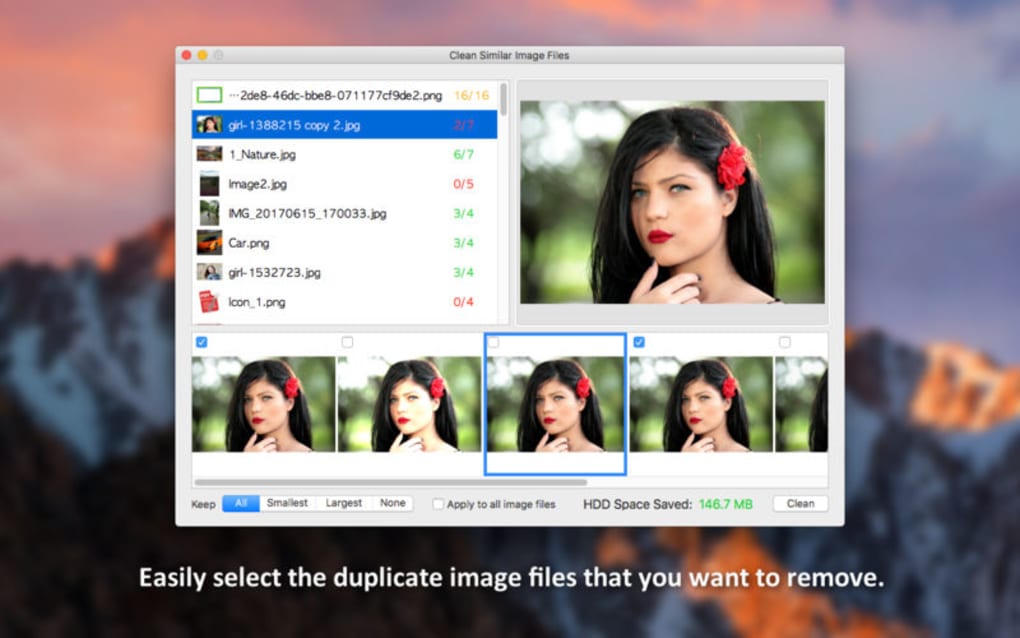
- Thumbnail Preview: Large, zoomable thumbnails allow you to compare images side‑by‑side without opening external editors.
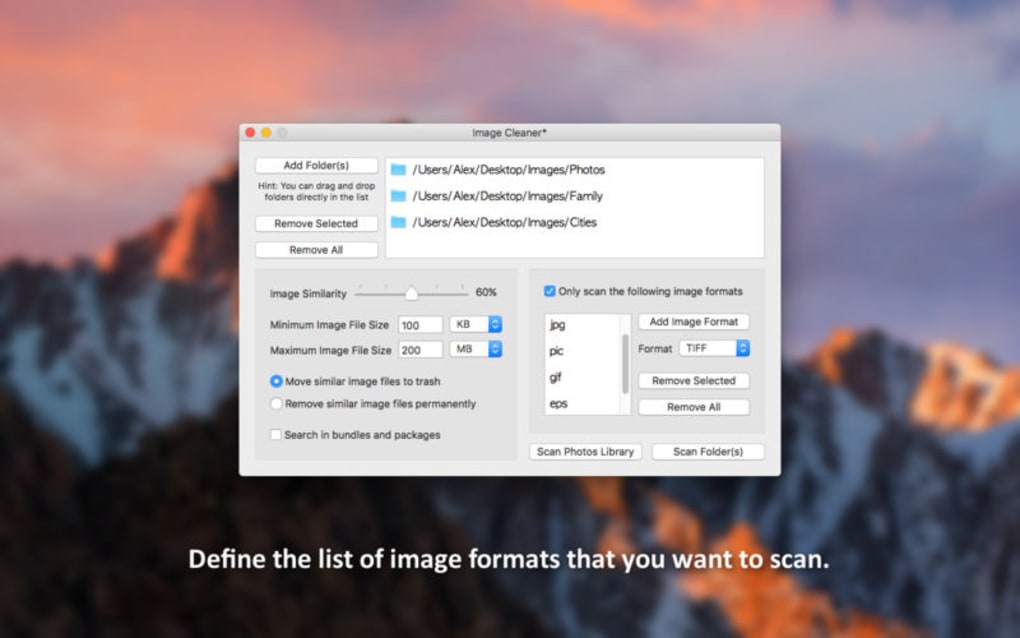
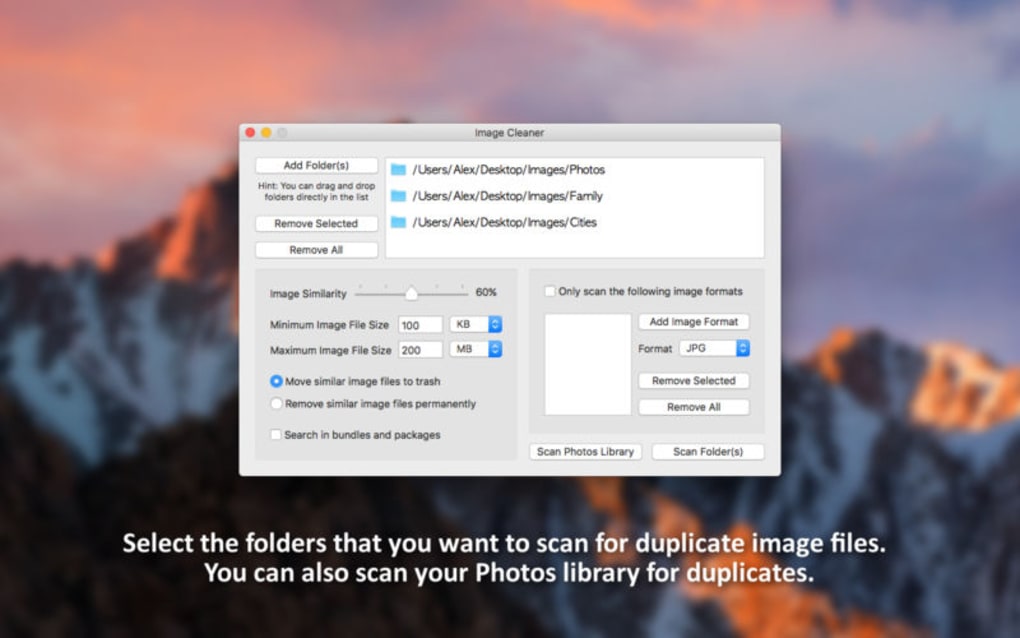
- Customizable Scan Scope: Choose specific folders, drive letters, or file extensions (.jpg, .png, .tif, .bmp, etc.).
- Grouping & Tagging: Automatically creates groups of duplicates and lets you assign custom tags for later reference.
- Export & Report: Generate CSV or HTML reports summarizing duplicate sets, useful for audit trails or sharing with teammates.
- Safe Deletion Workflow: Files are never removed automatically; you must move them to a “Recycle Bin” within the app before final deletion.
- EXIF Metadata Viewer: View camera settings, capture date, and GPS data directly inside the interface.
- Low System Footprint: Runs on less than 50 MB RAM, making it suitable for older PCs.
- Regular Updates: Free updates improve detection algorithms and add support for new image formats.
- Multi‑Language Support: Interface available in English, Spanish, French, German, and more.
Installation, Usage & Compatibility
Step‑by‑Step Installation
- Visit the official Image Cleaner download page and click the Download Free button. The installer is a signed
.exefile, ensuring a secure installation. - Run the installer and follow the wizard: accept the license agreement, choose an installation folder (default is
C:\Program Files\ImageCleaner), and decide whether to create a desktop shortcut. - After installation, launch Image Cleaner from the Start menu or the desktop shortcut. The first launch may prompt you to allow the app to access your pictures folder; grant permission for full functionality.
How to Scan for Duplicates
Once opened, click the New Scan button. In the dialog that appears, select the folders you wish to scan—this can be your Pictures library, an external drive, or any custom directory. You can also set a similarity threshold (e.g., 80 % for strict matches, 60 % for looser grouping). After configuring options, press Start Scan. The engine will analyze images using perceptual hashes, which are fast and accurate for visual similarity detection.
Reviewing and Managing Results
The results pane shows groups of duplicate images. Each group lists a “master” image (the highest‑resolution file by default) and its matches. Use the checkboxes to select images you want to keep or move.
The Tag button lets you assign a label like “To Review” or “Archive”. When you’re satisfied, click Move to Recycle Bin. The app moves selected files to a dedicated ImageCleaner_Recycle folder, where you can recover them within 30 days before permanent deletion.
System Requirements & Operating System Support
Image Cleaner runs on Windows 10, Windows 11, and Windows 8.1 (both 64‑bit and 32‑bit). Minimum specifications include a 1 GHz processor, 2 GB RAM, and 100 MB of free disk space for installation. While the tool is currently Windows‑only, a macOS version is planned for future releases.
Pros & Cons
Pros
- Fast visual similarity detection saves time.
- Free, no hidden fees or trial limitations.
- Safe deletion workflow prevents accidental loss.
- Low memory usage, suitable for older PCs.
- Detailed EXIF viewer helps make informed decisions.
- Customizable scan thresholds and folder selection.
- Exportable reports aid in documentation and sharing.
- Regular free updates improve algorithm accuracy.
- Multi‑language interface expands accessibility.
- Secure installer signed by a trusted certificate authority.
Cons
- No automatic deletion; manual review required.
- Currently Windows‑only; no native macOS or Linux build.
- Similarity engine may miss duplicates with heavy editing (e.g., large crops).
- Large photo libraries (>50,000 images) can increase scan time.
- No cloud‑storage integration; works only on local drives.
- Lacks AI‑based quality assessment to prioritize sharpest images.
- Interface, while simple, feels dated compared to modern UIs.
- No built‑in backup feature; users must manage backups separately.
- Limited support for RAW formats beyond common extensions.
- FAQ section could be more extensive for advanced use cases.
Frequently Asked Questions
-
Can Image Cleaner delete files automatically?
No. Image Cleaner is designed to group duplicates and let you manually select which files to keep or move. This safety‑first approach prevents accidental loss of important photos.
-
Does the software support RAW image formats?
Image Cleaner can scan common RAW extensions such as .cr2, .nef, and .arw, but its visual similarity engine works best with JPEG and PNG. For extensive RAW collections, consider converting to a lossless format first.
-
Is there a limit to the number of files I can scan?
There is no hard‑coded limit, but scanning extremely large libraries (hundreds of thousands of images) may increase processing time and memory usage. It’s recommended to scan in batches for very large collections.
-
How does Image Cleaner protect my privacy?
All analysis is performed locally on your computer. No images are uploaded to external servers, and the installer is digitally signed to guarantee authenticity.
-
Can I export a report of duplicate groups?
Yes. Image Cleaner provides options to export the scan results as CSV or HTML files, which include file paths, similarity scores, and group identifiers for easy sharing.
Conclusion & Call to Action
Image Cleaner fills a niche that many free photo‑management tools overlook: a fast, secure, and completely manual workflow for locating duplicate images on Windows systems. Its visual similarity engine, combined with a clean thumbnail interface, makes the dreaded “photo overload” problem manageable without risking accidental deletions. While the lack of automatic removal and macOS support may deter power users, the safety‑first philosophy aligns perfectly with photographers who value control over their archives. If you’re ready to declutter your picture folders, improve storage efficiency, and keep your photo library organized, download Image Cleaner now and start scanning your hard drive today. The free version offers all essential features, and future updates promise even smarter detection algorithms.







